
DISCLOSURE LANGUAGE
I received compensation for my time. I have not been told what to purchase or what to say about any product mentioned in these posts. Consumers and bloggers are free to form their own opinions and share them in their own words. These policies align with WOMMA Ethics Code, FTC guidelines and social media engagement recommendations.

Passion for efficiency and integrated workflow lead to the creation of Steelray and the Microsoft Project Viewer.
Observing a deficiency in a process lead one man to develop a new software and eventually open his own software development company. Brian Leach, is an entrepreneur, coder, and former Project Manager but above all, he is a man who listens to the needs of his clients and addresses them with a solution to streamline their workflow. Brian once said, “I’ve found that most good new products come from a need and one or two enabling technologies.” Brian was able to identify several software needs and in turn created a solution providing ease of use to users while simultaneously enhancing the deficient software’s original capabilities.
Who: Brian Leach is the Founder and CEO of Steelray and the creator of Steelray’s Microsoft Project Viewer. His resume is impressive, and he has worked as a Project Manager or Consultant for the likes of Harris Computer Systems, Ford Motor Company, IBM, Motorola, Cygnus Solutions, and Red Hat. Brian has a Bachelor’s Degree in Math from Emory University and a Master’s Degree in Computer Science from Georgia Institute of Technology.
Brian developed a software for Project Managers in industries which rely on broad and complex schedules, like construction and national defense.

Brian took his passion for Project Management and created a business. He is now the President and CEO of Steelray.
What: After years of relevant work, Brian personally encountered several issues and limitations while using the most common project management software, Microsoft Project & Portfolio Management (Microsoft PPM). He worked to devise several workarounds which as a result, streamlined his personal workflow, however at the time he used those efficiencies for himself and his team. He would later go on to develop an ever-evolving software enhancement for Microsoft PPM, and under the company he created Steelray, he would launch Microsoft Project Viewer. Microsoft Project Viewer is also compatible with other project management software solutions like Microsoft Project 98 through Project 2016, Excel, Primavera .XER, and UN/CEFACT XML files.
When: In the mists of the dot-com bubble Brian, ventured into independent business ownership and actively pursued the launch of Microsoft Project Viewer. In 2000 he left all the comforts of working for someone else to continue his dream, but success and sales did not take off until the end of 2003 and early 2004. Now Microsoft Project Viewer is a well-known and trusted software solution for Project Managers nationwide.
Where: Brian and the Steelray team is based out of Atlanta, Georgia, but they have clients located all over the United States.
Why: As a Project Manager Brian encountered several issues with Microsoft PPM including unnecessary complexities involving printing and viewing project details, schedule maintenance, and exorbitant overhead costs.
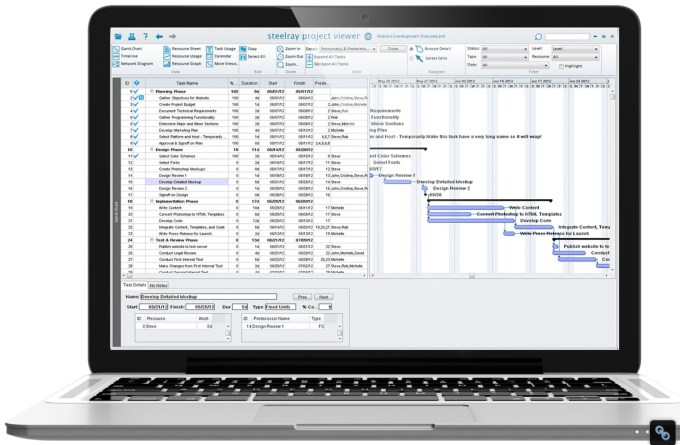
First, Brian noticed that the printing functionality offered by Microsoft PPM was limited when you were working with compounding schedules. He observed the tediousness required to print out and tape together large calendars, for the simple purpose of getting a holistic overview of a plan and even then, the schedule lacked many of the essential details which could only be accessed on screen and within the software. In response, Brian developed new printing standards for Microsoft Project Viewer. Users can preview all pages, on page, or the actual page size before printing. This seemingly simple feature gives users the ability to condense the overall size of the printout and number of pages required for each schedule. Microsoft Project Viewer also provides users with the option to control the page size, orientation, and header data.
When companies opt to utilize Microsoft PPM every stakeholder in the project needs to have a license for the software to efficiently view and alter the ever-changing schedule and task lists. Considering this type of software is utilized by companies in industries with numerous stakeholders, like construction or National defense, the cost to procure a license for everyone is expensive. Essentially, this process made each member of the task force a pseudo Project Manager because they were required to update their progress within the software regularly. Microsoft Project Viewer eliminates some of the overhead cost because only the Project Manager needs a license for Microsoft PPM software as long as the other members have access to the less expensive Microsoft Project Viewer.
Plus, Brian developed a web-based script which allows all users with Microsoft Project Viewer to send updates to the Project Manager who then inputs the information into the schedule on Microsoft PPM. Amazingly, Microsoft Project Viewer presents all the information in a similar manner as Microsoft PPM. So Gantt charts and schedules appear almost identical in both software solutions. Once the Project Manager makes the update, the other team members can see what tasks are complete, what is left to do, who is assigned to each job, and when things are forecasted for completion.
Brian and the entire Steelray team has made it easier than ever to streamline your team’s schedules without incurring unnecessary overhead. If you are interested in learning more about Microsoft Project Viewer, consider trying the free 10-day trial.



 Family Friendly Daddy Blog